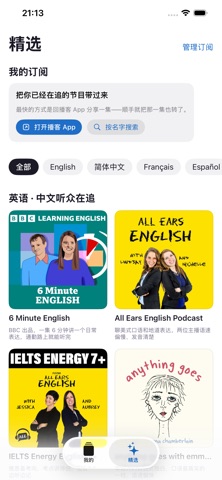
Shows you care about,
without the language barrier.
Search for a show or share an episode link, then choose your listening language. Cloud translation prepares it for you.
 TransUtter
Great content deserves to be understood
The podcasts you want to hear. The articles you want to read.
TransUtter turns them into your language and reads them aloud.
Requires iOS 18.0 or later · In-app purchases
Let curiosity cross languages
5 languages · 20 translation directions
Listen before you decide
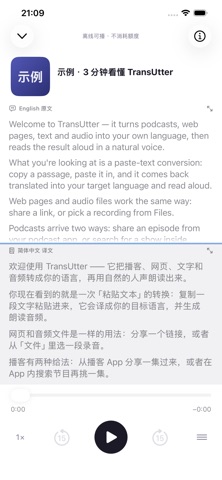
Tap play to hear TransUtter.
Read the original and translation together as you listen.
Built-in app demo · synthetic English and Chinese voices
ENGLISHWelcome to TransUtter — it turns podcasts, web pages, text and audio into your own language, then reads the result aloud in a natural voice.
简体中文欢迎使用 TransUtter —— 它把播客、网页、文字和音频转成你的语言,再用自然的人声朗读出来。
Bring great content into every day
A podcast on your commute. An article on your walk. Discover new ideas at your own pace.
Search for a show or share an episode link, then choose your listening language. Cloud translation prepares it for you.
Read the original beside the translation with synchronized playback highlighting. Tap any line to hear it again.
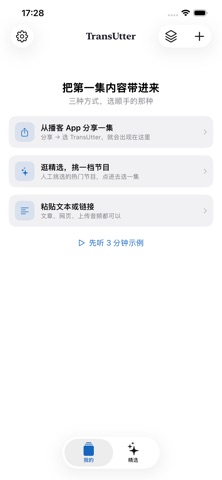
Share a web page, paste text, or import local audio. Turn what is on your screen into something you can hear.
TRANSUTTER
One place to listen to podcasts, articles, text, audio and email.
Getting started is simple
Choose a podcast, share a web page, or import text and audio.
Select the source and target languages, then review processing and point usage.
When processing finishes, listen and read along—even from the Lock Screen.
Good to know
Translate between Simplified Chinese/Mandarin, English, French, Spanish, and Brazilian Portuguese. TransUtter supports podcasts, web articles, pasted text, local audio, and forwarded email. Receiving email needs internet access. Web pages and episode links must be reachable.
The app is free to download and offers in-app purchases. Podcast cloud translation uses points; other content can also use cloud processing. Current plans and offers appear in the app, and usage is shown before you submit.
On supported iPhones, text and local audio can be processed on device without points after the required language packs, model, and voices are ready. Keep the app in the foreground during translation. Fetching web articles and translating podcasts require a connection.
Listen after processing completes. Time varies with content length, network conditions, and processing mode; the app shows progress.
Speech recognition, translation, and narration are machine generated and can contain errors. Use the bilingual transcript to check important information against the original.
TRANSUTTER
Start your next discovery with a podcast.

Requires iOS 18.0 or later · In-app purchases
 Scan with iPhone to download